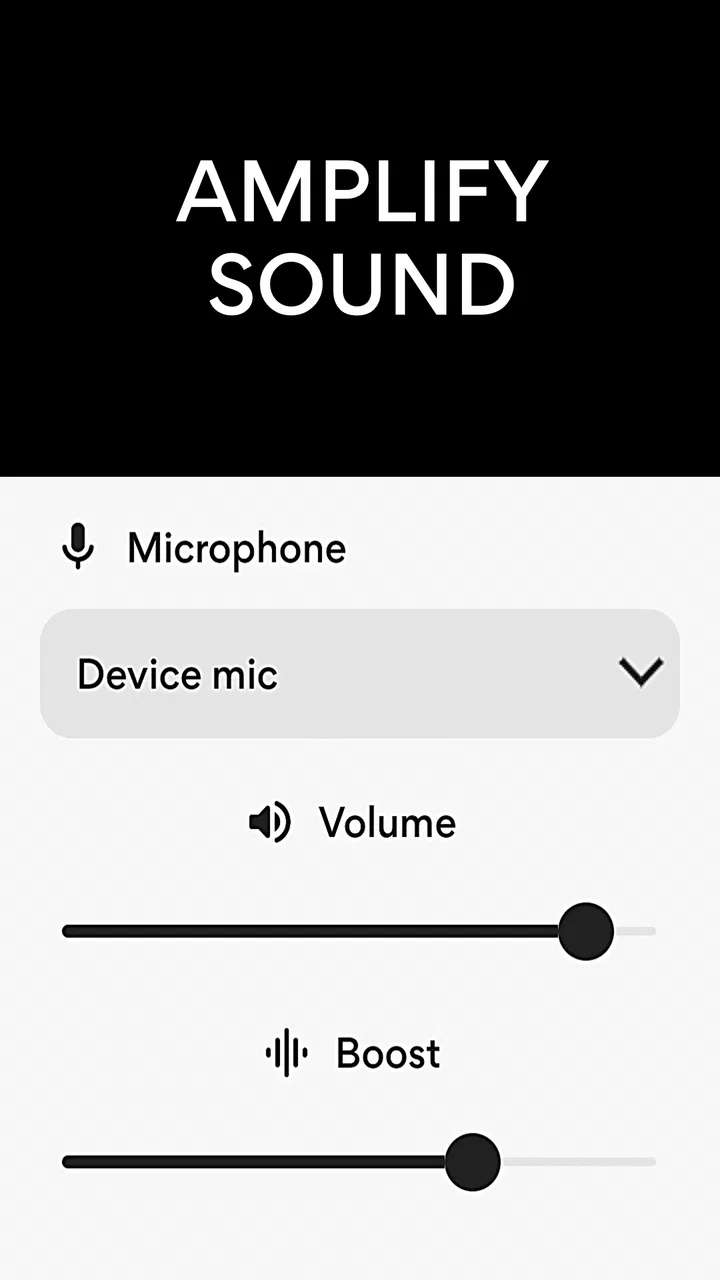
Microphone Amplifier
- 4.3
- Rating
- 10.00M
- Installs
- Free
- Price

 Analysis by App-foxy
I tried Microphone Amplifier as a practical hearing aid for everyday situations, and my first impression was simple: it turns an Android phone into a basic sound-amplifying tool without asking me to buy dedicated hardware first. The idea is especially useful when a conversation is quiet, a television is difficult to hear, or I want to bring a microphone closer to a speaker while listening through headphones. It is a medical-category app from DOSA Apps, but I would treat it as an accessibility aid rather than a replacement for a hearing professional or a properly fitted hearing device.
The app is free to install and aimed at Everyone, which makes it easy to try without a financial commitment at the start. Its current version is 13.1.0, and it runs on Android 5.0 or later. That broad compatibility matters because an older spare phone can become a useful listening device instead of sitting unused in a drawer. At the same time, optional purchases range from around one dollar to around one hundred dollars per item, so I would pay attention to any upgrade screen before confirming a purchase.
How the current experience works in real life
The central workflow is straightforward. I place the phone near the sound source, connect headphones or another listening setup, and use the phone microphone to capture nearby audio. The result is a louder version of what the microphone hears. In practice, the phone’s position becomes more important than I initially expected. On a table, it can pick up a speaker’s voice; in a noisy room, it may also collect dishes, footsteps, ventilation and nearby conversations.
You May Also Like

 Pandora - Music & Podcasts
Pandora’s Music Is Easy to Start, but Harder to Recover
Pandora’s strength is its low-effort path from a seed to a station. Its weak spot is how much confidence it asks you to place in connection, setup, and quiet recovery.

 AccuWeather: Weather Radar
AccuWeather Review: A Quick, Clear Forecast for Everyday Decisions
For everyday plans, the best forecast is the one you can understand quickly. AccuWeather makes rain timing, radar, and local conditions easy to act on, with a few trade-offs.

 Hill Climb Racing
Why Hill Climb Racing Still Turns Crashes Into One More Run
A tiny car, a bumpy hill and one more upgrade: Hill Climb Racing keeps resurfacing because its simple chaos makes every near-miss feel personal.

 AliExpress - Shopping App
AliExpress Makes Global Shopping Feel Personal, but Shoppers Bear the Risk
AliExpress turns a global marketplace into a pocket-sized discovery engine. Its reach is useful, its shopping loop compelling, and its trade-offs easy to miss.

 Lords Mobile: Kingdom Wars
Lords Mobile Is a Kingdom-Building Routine, Not a Quick Match
A case-by-case verdict on the building, battles, device demands, and social commitments that make Lords Mobile rewarding for some players and exhausting for others.

 PDF Scanner app - TapScanner
TapScanner Makes Paperwork Easier to Capture, Check, and Share
TapScanner makes scanning with a phone feel less like a rescue operation and more like a dependable step in getting work done. Its capture tools are useful, though not flawless.
More From Our News Desk
View All News


That makes Microphone Amplifier most useful when the distance between me and the sound source is the main problem. For example, if I am sitting several seats away from a family member speaking quietly, placing the phone on the table between us can make the voice easier to follow through headphones. It is less convincing when the room itself is loud, because amplification does not automatically know which sound I want and which sound I want removed.
I also found that the choice of microphone matters. The phone microphone is convenient, while a headset microphone can be better positioned for certain situations. A wired headset may keep the microphone close to the person speaking, but the cable can be awkward. A wireless headset gives more freedom, although any Bluetooth delay can make conversations feel slightly disconnected. This is not a flaw unique to this app; it is a trade-off created by the audio path between microphone, phone and headphones.
The best results come from treating the phone as a carefully placed listening tool, not as a magic volume button. Before using it in a conversation, I would test the distance, adjust the phone’s position, and keep the volume at a comfortable level. A little preparation can make the difference between clearer speech and an unpleasant wall of amplified background noise.
A useful setup for conversations
For a quiet conversation at home, I would place the phone on a stable surface with the microphone facing the person speaking. I would start with a modest amplification level and increase it gradually. Turning the level up immediately can make handling noise and sudden sounds surprisingly sharp. If the speaker moves around, moving the phone with them may help more than increasing volume.
There is also a privacy consideration. Because the phone is actively listening through its microphone, I would avoid leaving it running in shared spaces when it is not needed. The sensible habit is to stop the session after the conversation and disconnect the listening device. That is not merely about privacy; it also prevents accidental feedback, battery drain and confusing audio when the phone is placed in a pocket or bag.
For television listening, the result depends heavily on where the phone can be placed. Near the television speaker, it may make dialogue easier to hear, but it will also capture the room. If the television has a headphone output or a dedicated accessibility mode, that direct connection is usually cleaner. Microphone Amplifier is more useful when I cannot connect directly to the television or when I need a quick, temporary solution.
What the app does better than ordinary alternatives
The usual alternative is simply raising the television or phone volume. That can help the person using the device, but it may disturb everyone else. With an amplifier app, I can listen through headphones while other people in the room keep the overall volume lower. That is a meaningful advantage in shared homes, especially at night.
Another alternative is a hardware personal sound amplifier. Dedicated devices can be more discreet, more consistent and better suited to repeated daily use. They may also offer controls designed specifically for hearing assistance. Microphone Amplifier wins on accessibility and experimentation: I can use a phone I already own, test the concept quickly and avoid carrying an extra device. For occasional use, that convenience is hard to ignore.
Compared with a hearing test and professionally fitted hearing aids, however, this app occupies a completely different level. It does not turn a general-purpose phone into a medically fitted solution. People with persistent hearing difficulty, one-sided hearing loss, pain, sudden changes or trouble understanding speech even in quiet surroundings should not rely on amplification alone. A hearing assessment is the better next step in those situations.
What has changed and what that means for users
The application was released on August 16, 2019, and the current version shows that it has continued to receive attention rather than remaining frozen as an old utility. I would not interpret the version number alone as proof of a particular feature or improvement, but it does tell me that the app has an ongoing product history. For someone installing it today, the practical point is that the current build, rather than an early release, is the version to judge on a compatible phone.
Its popularity also suggests that the concept has reached a broad audience: the app has more than ten million installs, with an average rating of 4.3 from roughly fifty-nine thousand ratings. I see that as a reason to take the app seriously as a useful tool, not as proof that it will work equally well for every phone, headset or hearing situation. Audio behavior can vary widely between devices, and personal hearing needs are equally varied.
For existing users, updating to the current version is sensible when the phone supports it, particularly if an older installation behaves inconsistently. Still, I would not update immediately before an important event without testing the complete setup. A phone update, a new headset connection or a changed system audio setting can alter the experience even when the app itself feels familiar. A short test at home is more valuable than discovering a problem during a meeting, appointment or family gathering.
The app’s long availability is also helpful for people using older Android phones. Since the minimum requirement is Android 5.0, the entry barrier is lower than with many newer medical or accessibility tools. That does not guarantee identical performance on every old device. Microphone quality, speaker placement, battery health and the phone’s background audio handling still influence the result. My advice would be to use the oldest phone that remains reliable, rather than assuming the oldest compatible phone will provide the clearest sound.
Small workflow changes that make a noticeable difference
One useful habit is to create a repeatable setup for a specific situation. For television, I would use the same table position and headset whenever possible. For conversations, I would place the phone at the center of the group only when everyone is comfortable with that arrangement. Repeating a known setup reduces the temptation to keep increasing amplification when the real issue is microphone distance.
A second practical tip is to test with speech rather than music. Music can sound impressive when amplified, but speech reveals whether the app is genuinely helping. I would ask someone to read a few ordinary sentences from different distances and with normal background noise. If the words remain unclear while the volume becomes uncomfortable, louder is not the answer; the problem may be room noise, microphone placement or the limits of the phone’s audio hardware.
A third trade-off involves using the phone for other tasks. A dedicated amplifier can remain available while I use my phone normally. With this app, the phone is occupied by the listening job, and notifications or accidental touches may interrupt the experience. For a short conversation that is acceptable. For a long appointment or regular daily use, a dedicated device may be less distracting and more dependable.
I would also keep the phone physically stable. Holding it in my hand introduces rubbing and handling noise that can be louder than expected through headphones. A stand, table or soft surface is better, provided the microphone is not covered. This simple adjustment costs nothing and often improves clarity more than experimenting with every available volume control.
Where the current approach still falls short
The most important limitation is selectivity. The app amplifies what the microphone receives, so it cannot reliably separate a quiet voice from every competing sound in a busy environment. In a restaurant, on public transport or beside a running appliance, the experience may become tiring rather than helpful. People expecting automatic speech enhancement should keep their expectations modest.
Feedback is another possible source of frustration. If amplified sound from the headphones reaches the microphone, the system can produce an unpleasant squeal or echo. Keeping the listening device away from the phone microphone helps, as does using headphones that seal reasonably well. If feedback continues, lowering the level or changing the physical arrangement is safer than simply pushing through it.
Comfort matters too. Listening through headphones for a long period can be tiring, especially when the volume is high. I would take breaks and avoid using amplification to compensate for an uncomfortable fit. The app can make sound louder, but it cannot correct a poorly fitting headset, a damaged microphone or a phone case that blocks the microphone opening.
The free entry point is welcome, but the presence of optional purchases means the overall experience may not feel completely frictionless for everyone. Since the listed purchase range extends from around one dollar to around one hundred dollars per item, I would review the wording of any paid option carefully and decide whether the basic workflow already meets my needs. For occasional amplification, paying is difficult to justify unless a specific extra is genuinely useful to me.
Who should use it, and who should choose something else
I would recommend trying Microphone Amplifier if you need occasional help hearing speech, want to listen to a television without raising its room volume, or are testing whether personal amplification could fit into your routine. It is also a reasonable option for someone helping an older relative experiment with phone-based accessibility before considering dedicated equipment. The low installation barrier makes that first experiment simple.
I would be more cautious about recommending it as the main solution for someone who uses hearing assistance throughout the day. A phone-based setup requires positioning, charging, a compatible listening device and attention to background noise. Those demands may be manageable at home but inconvenient during shopping, walking, travel or work. A purpose-built hearing device or professional evaluation is likely better when reliability, discretion and consistent speech processing matter more than convenience.
I would also skip it for urgent or unexplained hearing changes. An amplifier can make sound louder without addressing the reason hearing has changed. It should not delay medical advice, especially when the change is sudden, painful or noticeably different between ears. In those cases, the right choice is assessment rather than a stronger volume setting.
What I would watch in future use
When I continue using the app, I would pay attention to stability across different headsets and phone models, the ease of controlling amplification during a conversation, and how well it handles background noise. Those are the areas that determine whether a microphone amplifier remains a handy occasional tool or becomes frustrating in real environments. A feature can look useful in a quiet room but feel very different around several simultaneous speakers.
I would also watch how clearly the app explains any optional purchase and whether the basic experience remains practical for someone who only needs occasional help. Since the app is free to start, transparent control over paid choices is important. I would rather see a simple, predictable workflow than a long setup process that distracts from the central task of hearing speech.
My overall view is positive but deliberately practical. Microphone Amplifier gives an existing Android phone a useful accessibility role, and it can solve a real problem in quiet, controlled situations. Its strongest quality is convenience: I can try it with equipment I already have, adjust the setup to the room and avoid disturbing people nearby. Its greatest weakness is that it amplifies the microphone’s whole environment, so it cannot replace the selectivity or comfort of dedicated hearing technology.
For me, the right way to recommend it is as a low-cost experiment and an occasional listening aid, not as a universal answer to hearing loss. If your main need is a quieter television session or a clearer nearby conversation, it is worth trying. If you need dependable assistance everywhere, or if your hearing difficulty is persistent or changing, I would move beyond the app and seek a more suitable professional or hardware-based option.
FAQs for Microphone Amplifier
01What is the primary function of the Microphone Amplifier app?
The Microphone Amplifier app is designed to enhance the audio input from your device’s microphone. It amplifies the sound, making it louder and clearer, which can be particularly useful in environments with background noise or for users with hearing difficulties. The app offers customizable settings to adjust the amplification level according to user preference.
02Is the Microphone Amplifier app compatible with all Android and iOS devices?
While the Microphone Amplifier app is designed to work on most Android and iOS devices, compatibility may vary depending on the specific model and operating system version. It’s important to check the app’s requirements on the download page to ensure it supports your device. Regular updates aim to expand compatibility and improve functionality.
03Does using the Microphone Amplifier affect battery life significantly?
The app, like any other that processes audio in real-time, can have an impact on battery life, especially if used continuously for extended periods. However, the developers have optimized the app to minimize battery consumption as much as possible. It is advised to monitor your device’s battery usage when using the app extensively.
04Are there any privacy concerns with the Microphone Amplifier app?
Privacy is a top priority for the Microphone Amplifier app developers. The app requires microphone access to function, but it does not store or share your audio data. Users are encouraged to review the app’s privacy policy, which outlines data handling practices, to ensure it aligns with their privacy expectations.
05Can the Microphone Amplifier app be used for live performances or recording?
The Microphone Amplifier app can enhance live audio for small performances by amplifying sound in real-time. However, while it improves volume and clarity, it may not match the professional quality of dedicated audio equipment for recording. Users should test the app to see if it meets their specific performance or recording needs.
Pros
- Easy to use interface for quick adjustments.
- Effective sound boosting without distortion.
- Customizable settings for different environments.
- Compatible with most audio input devices.
- Low resource usage
- doesn't drain battery.
Cons
- Limited advanced features for audio experts.
- Ads can be intrusive during use.
- No built-in recording function.
- Requires permissions for full functionality.
- Occasional bugs with Bluetooth connections.

Microphone Amplifier
Gallery